
Equipment maintenance software that reads the machines itself.
Backoffice plans the week from the meter readings on every machine, and Field Office runs it on site.

30% more tasks
in the same time.
25% less driving
by planning visits ahead of time.
No system to replace
It feeds your ERP, like Dynamics 365 Field Service, or your own.
Smarter maintenance for every machine.
See every machine without reading a meter
A Beam on the equipment reports litres, room temperature and hours of use over its own mobile connection. It reads third-party meters too, so a mixed fleet works from day one.
Let the week plan itself
Backoffice turns those readings into work. A task appears when a filter nears the litres it is rated for, and nearby stops group into one window per location, so the van drives less.
Run the day from a phone
Field Office hands the technician the day's stops, directions and packing list. A QR scan pulls up the machine and its history, and the swap is logged in a couple of taps.
Enrich the systems you already run
Service tasks go to your ERP, like Dynamics 365 Field Service, and the integration runs both ways. Usage is logged per customer and per location, so the invoice comes from data nobody re-keyed.
How it works
Set it up once. It runs itself.
01Put a Beam on the machine. It goes on in an afternoon and reads the machine straight away.
02It connects by itself. The Beam has its own mobile signal, so it sends its readings on its own. No Wi-Fi, no setup.
03It plans the visits for you. Flowplan sees how much each machine is used and works out when it needs a check. Nobody picks dates.
04No forms to fill in. The technician gets the job and the right parts, does the work, and ticks it off on the phone.
05The office gets it all. Every number goes straight into the systems you already use, and each customer can see their own numbers too.

One integrated platform.
From consumption data to invoicing, the Flowplan software brings insight, service, and billing together in one place.
Your overview, your layout
Smart dashboard
The first thing you see when you log in: a fully customisable dashboard where widgets cover every part of the operation, from installations and tasks to usage and service.
- Widgets for everythingLive map, task calendar, usage and service stats: every corner of the app has a widget.
- Drag and dropArrange the layout so the overview fits your workflow.
Per machine · tap · filter
Consumption data
Track consumption in near real time, down to the individual drink, tap, and filter. No manual readings.
- Leak detectionAbnormal flow is flagged automatically, before it becomes water damage.
- Per-beverage metricsData broken down by each drink type and portion size.
Data-driven insights
Insights
Spot patterns and waste before they become a problem: consumption trends across installations, down to the individual pour.
- Drink detectionMachine learning classifies flow patterns into drink types and sizes.
- Draft beer & wastePer-pour data and poured-versus-sold waste analysis for tap systems.
Automatic monitoring
Water quality
Keep an eye on water quality right in the platform. Follow filter capacity and quality trends over time, and catch deviations before they affect taste or machines.
- Quality over timeTrack how water quality evolves on each installation.
- Filter capacitySee how much capacity is left, based on actual consumption.
Capacity & overview
Performance reports
Automatically calculated capacity and reports that give management a clear view of operations across every location.
- Automatic capacityBackoffice computes operational limits for you.
- Share with customersGive customers access to relevant consumption and performance data.
Service at the right time
Smart task windows
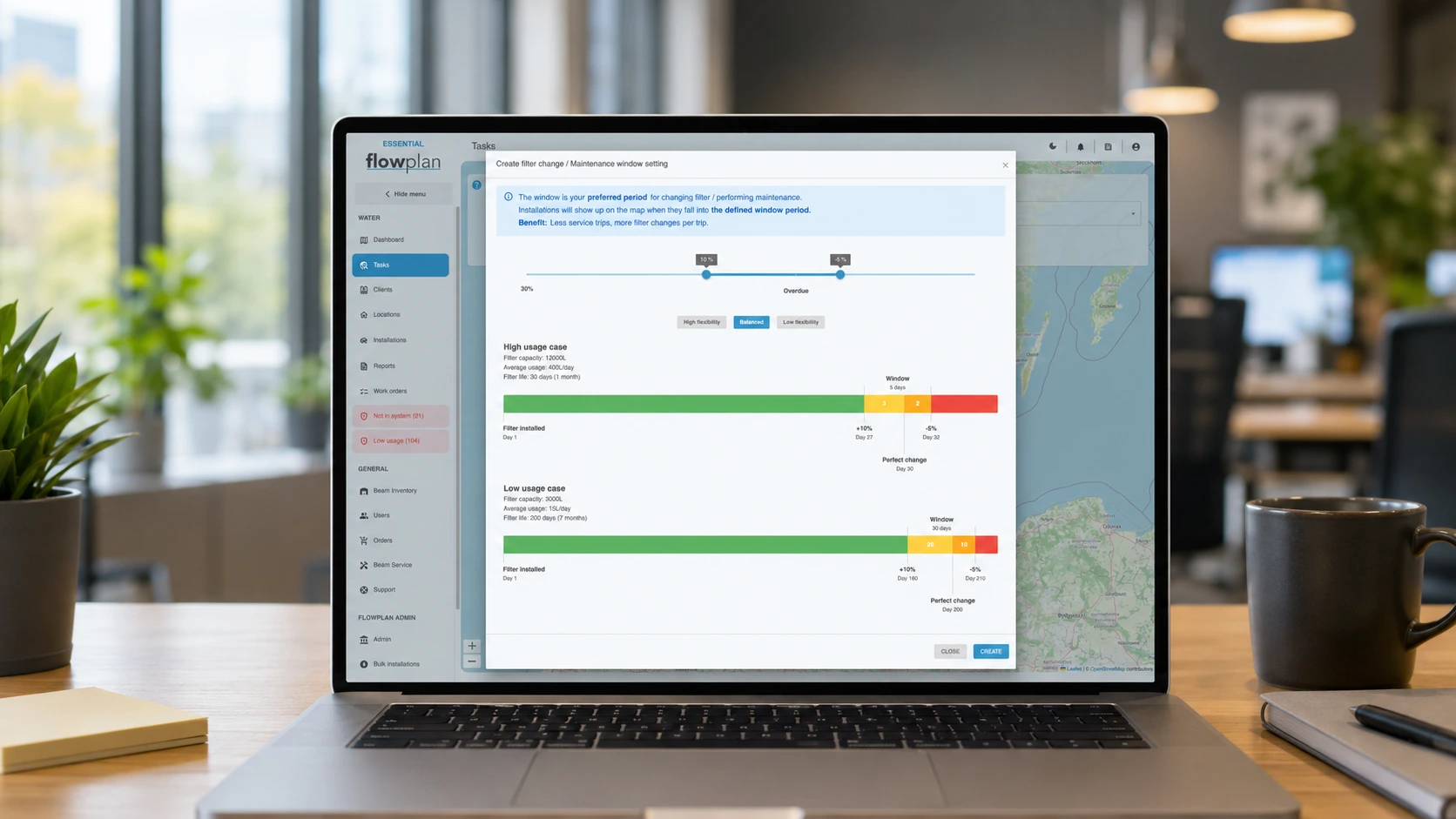
The platform predicts when service and filter changes are due and groups stops into smart task windows per location.
- Predictive serviceThe model flags filter changes before they become urgent.
- Location overviewSee which locations need a visit soon.
Connected to your systems
Integrations
Connect Flowplan to the tools you already use across your ERP, POS, inventory and accounting. Data flows both ways through open integrations.
- Two-way integrationCreate and update customers, locations and installations from your own systems.
- Tasks & eventsSend service tasks to your ERP, like Dynamics 365 Field Service, and have filter, leak and connection events pushed automatically.
From usage to invoice
Billing-ready data
Consumption and service history are logged per customer and location, ready to feed your invoicing flow through reports and the integration.
- Usage per customerWater usage and service events, split by customer and location.
- Less adminNo manual readings or double entry: the numbers are already collected.
Mobile app for technicians
Field Office
The technician's co-pilot in the field: scan, swap, and confirm on the spot. The same data as Backoffice, always in sync.
- Scan & identifyA QR scan pulls up the machine, filter, and history instantly.
- Log service on siteRecord filter swaps and tasks in a couple of taps.
- Task map & packing listDue tasks per location, directions, and which filters to bring.
Get the Field Office app

Where it fits
It does not replace your ERP system.
Most service teams already run equipment maintenance software of some kind, to schedule work and raise invoices. Flowplan does not ask you to move off it. The platform sits underneath: it reads the machines, works out what needs doing and when, and puts that into the system your team already opens every morning.
Service tasks go to your ERP, like Dynamics 365 Field Service. Filter, leak and connection events are pushed automatically. The integration runs both ways, so you can create and update customers, locations and installations from your own systems, and read consumption back out per customer and per location. We can integrate with any ERP system, as long as there is a contact on their side who can help set it up.
What changes is where the work comes from. A task appears because a filter is close to the litres it is rated for, or because a line is running while the venue is shut. Nobody set that interval by hand.
Is this a CMMS?
No. A CMMS holds your asset register and the jobs against it, and it relies on someone entering what happened. Flowplan measures the equipment directly, works out what needs doing from that, and hands the job to the system you already use. Teams run both.
How is it different from the equipment maintenance software we already run?
Most equipment maintenance software schedules from a date and a service interval. This schedules from the machine: litres through the filter and hours of use. The interval stops being a guess, so visits land where they are needed.
Does it replace our ERP, like Dynamics 365 Field Service?
No, it feeds it. Service tasks are sent across, and filter, leak and connection events are pushed automatically. We can integrate with any ERP system, as long as there is a contact on their side who can help, and the integration goes both ways. And if you run no ERP or service system yet, Flowplan works as one on its own and scales with you: it is built for both situations.
What does the technician actually use?
Field Office on a phone. A QR scan pulls up the machine, its filter and its history, and the technician logs the swap in a couple of taps.
Where does the data come from?
A Beam on the machine, reading its own temperature sensor and whatever meter sits on the line. Beam reads third-party meters too, so a mixed fleet does not need standardising on our hardware first. On a coffee fleet that reading is coffee machine telemetry; on a water line it is water filter monitoring, the litres through the filter; on a beer line it is keg monitoring, every pour through the tap.
Can our customers see their own numbers?
Yes. You choose which consumption and performance figures each customer gets access to.
Can we invoice from it?
Water use and service events are logged per customer and per location, and come out through reports or the integration into your invoicing flow. Nobody re-reads a meter to raise the invoice.
Every number on these screens starts at a machine.
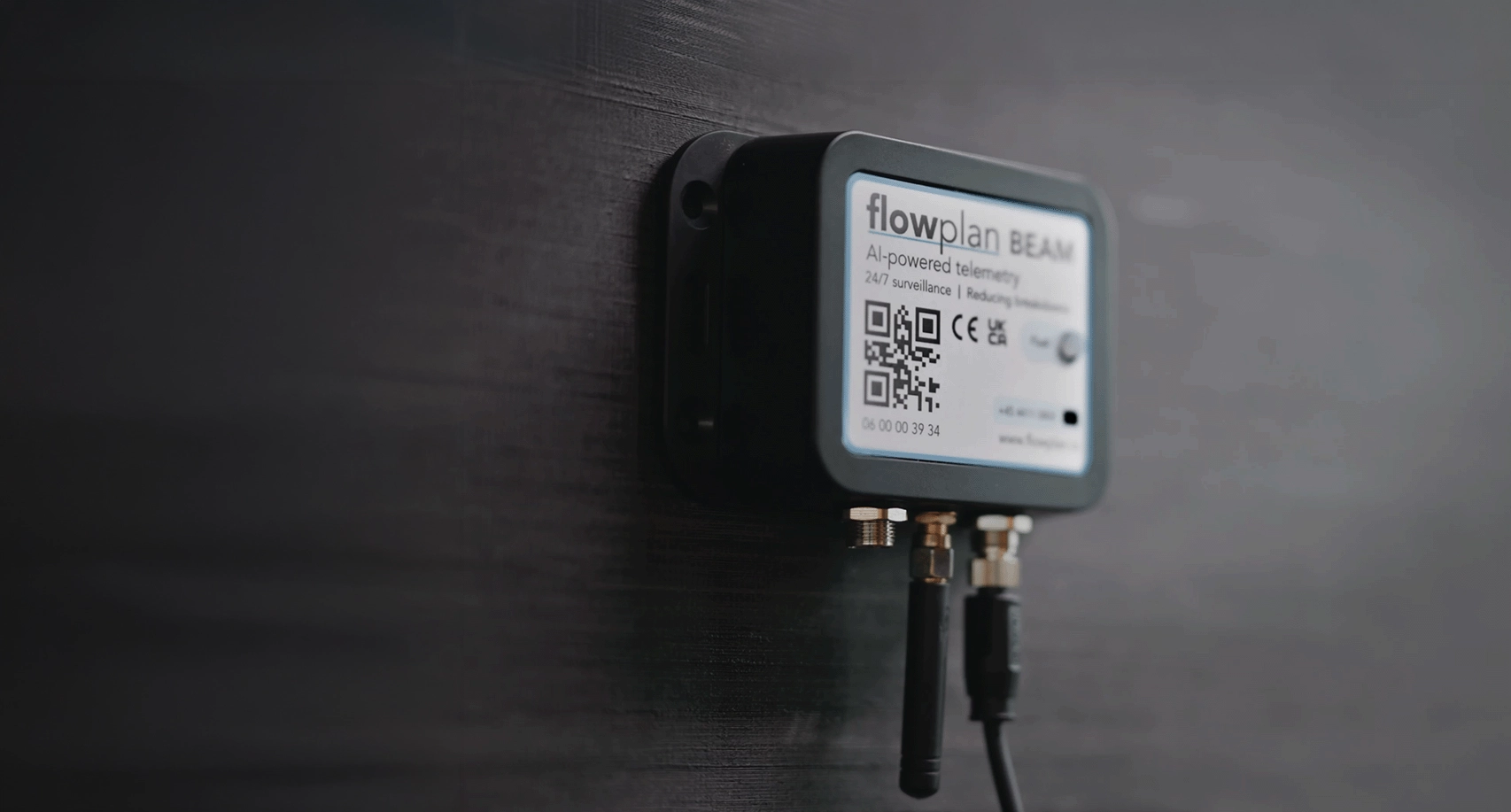
Beam is the transmitter on the equipment, a Flowmeter counts the litres on the line, and conductivity and level arrive as add-on sensors on Beam 4.0 Pro, with pressure coming soon.
Explore Beam